Problem: Lack of hands-on experience with Active Directory
Solution: Build it myself in a homelab
I wanted to deepen my understanding of Active Directory because, in every environment I’ve worked in, AD was the backbone of everything — but I only ever saw it from the outside. Any time I needed something changed, I had to submit a ticket to the system administrators, and my permissions were always limited.
As I move further into cybersecurity and information technology, I realized I had gaps in my knowledge that I couldn’t fill just by reading documentation or watching videos. So I built a homelab to finally get hands-on experience with the parts of AD I never had access to before.
This project became my way of learning how domains are structured, how Group Policy works, how users and computers are managed, and how real hardening is applied in an enterprise environment. What follows is the setup I built, what I learned along the way, and how you can recreate it yourself.
Setup
1. Infrastructure
I deployed a Windows Server 2022 and Windows 11 Pro VM via Proxmox.
2. Domain Setup
I installed Active Directory Domain Services and created my own domain, giving me full control over something I had only interacted with from the outside in past jobs.
3. Organizational Units
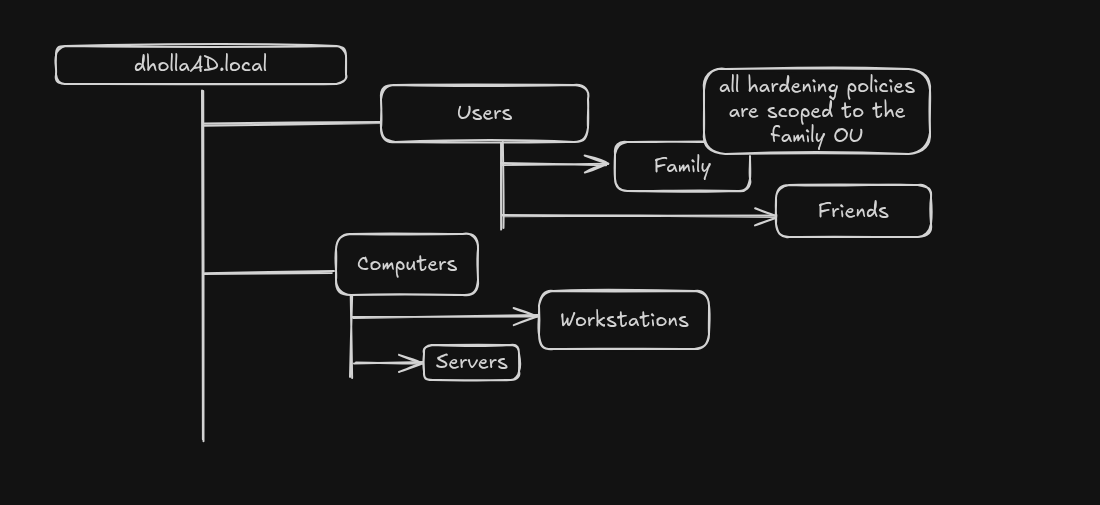
I organized the domain using OUs to separate users and computers:
- Users OU — two groups: Family and Friends, simulating different user types
- Servers OU and Workstations OU — mirroring a real enterprise layout
Along the way I tinkered with the environment: created test users, reset passwords, disabled and re-enabled accounts, and explored how AD handles identity lifecycle tasks. This gave me a feel for the day-to-day operations of an AD environment.
4. Hardening GPO
I built a Group Policy Object that includes:
- PowerShell logging
- Password policies
- Firewall settings
- Audit rules
I scoped this GPO specifically to the Family OU to test security policies safely without affecting the entire domain.
5. Domain Join & Verification
I joined a Windows 11 Pro VM to the domain and verified the GPO applied correctly, getting hands-on experience with domain joins, policy propagation, and troubleshooting using gpupdate, gpresult, and Event Viewer.
What’s Next
- Joining Linux machines to the domain — Ubuntu servers are the backbone of my current production environment
- Expanding my Group Policy knowledge
- Integrating AD logs with Wazuh
- Slowly expanding the environment